Site Weather with History for project reporting
Review weather history with date ranges, tables and charts for the conditions that affect construction work: temperature, wind, humidity, precipitation and alerts.
Weather history connected to site reporting
The module gives teams date-based weather records with table and chart review modes for reporting, diary context and weather-related discussion.
From daily weather to project evidence
Weather history is structured for review by date, condition and measurement so the team can support site diary notes and project records.
Choose the period
Review weather records over the date range relevant to the project question.
Compare conditions
Use table and chart views for temperature, wind, humidity, precipitation and alerts.
Support reporting
Keep weather context available when reviewing site diary records and project constraints.
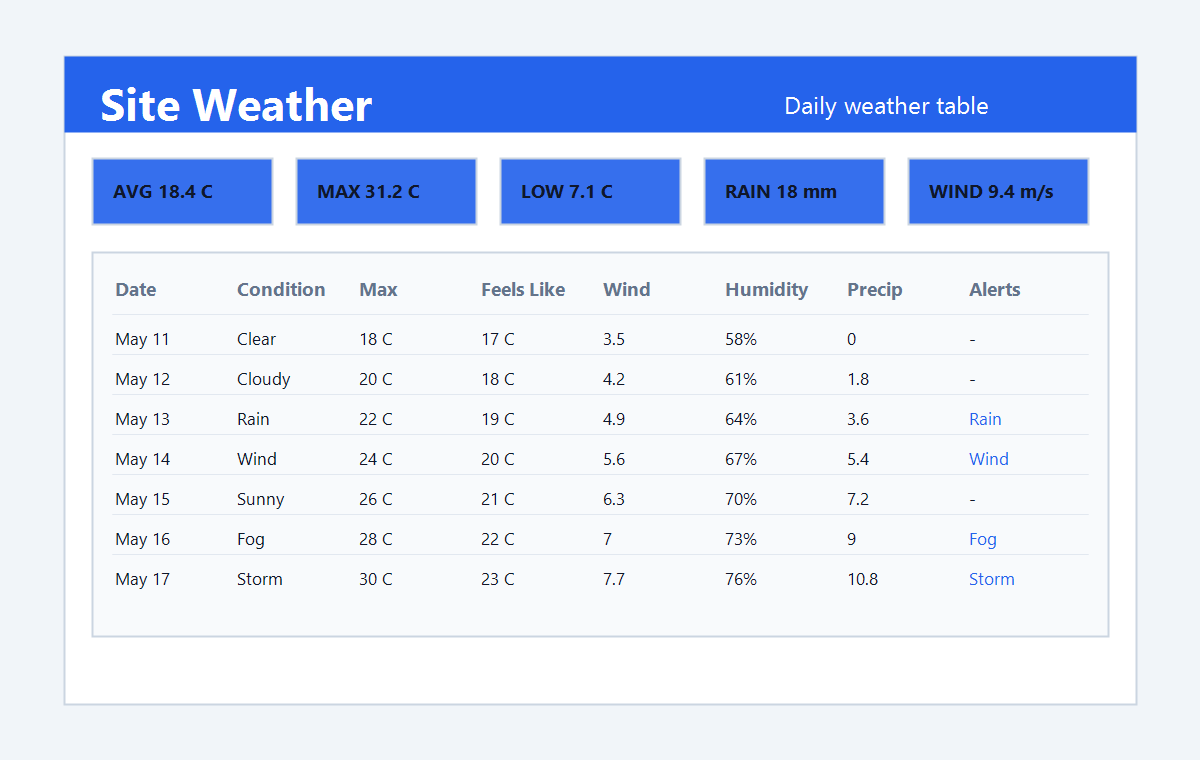
Weather history in context
Review table records, charts and weather details from the project workspace.
Where this fits in the project workflow
Use Site Weather with History when weather needs to support daily reports, delay reviews, safety discussions and project records. Teams can compare dated weather conditions with temperature, wind, humidity, precipitation and alert context, then reference those records later when reviewing site diaries, progress questions or formal reports.
Bring weather history into project reporting.
ArchiMesh keeps construction weather records available with table, chart and date-based review workflows.
Start Free Trial