All-In-One Construction Project Management

Build Smarter.
Manage Everything.

+50 native modules covering every phase from preconstruction to handover - planning, document control, BIM coordination, secure external file sharing, commercial management, safety, workforce operations, communication, ArchiPilot AI, 184 language locales and 13 selectable file storage regions.

archimesh.ai/app
ArchiMesh module screenshot
+ 0 Modules
0 Languages
0 Storage Regions
ArchiPilot AI

One Platform.
Every Module Included

The feature overview uses the same +50 native-module catalog as the detailed module showcase below.

10 modules

Project Controls & Records

  • ArchiPilot AI Project Assistant
  • Plans & Documents
  • Quantity Take-Off
  • Bill of Quantities
  • Site Diary
  • Site Weather
  • Site Access Management
  • Kanban Board
  • Notes
  • MoM (Minutes of Meeting)
10 modules

Workforce, Office & Viewers

  • Seating Plan
  • Timesheet & Expenses
  • Workforce Trainings
  • Asset & Inventory Management
  • Room Booking
  • Office & Project Directories
  • IFC Viewer
  • Office Files Viewer (Word, Excel, PowerPoint and More)
  • Autodesk File Viewer (RVT, DWG, NWD and More)
  • Primavera P6 XER Viewer
9 modules

Communication & Knowledge

  • Mail & Distribution Lists
  • Team & Project Chat
  • Video Meetings
  • Calendar
  • File Sharing
  • Knowledge Base
  • Service Desk
  • Recruitment & Jobs
  • Seating Plans
11 modules

Quality, Safety & Handover

  • BIM Clash Reports
  • PTW (Permit to Work) Management
  • Defect Management
  • RFI (Request for Information) Management
  • Incident Reports
  • Health & Safety Observations
  • Health & Safety Cards
  • Toolbox Talks
  • Waste Management
  • Construction Product Management
  • Commissioning
5 modules

Site Visibility & Workforce Planning

  • Site Cameras
  • Workforce Roster
  • Site Allocation Planner
  • Organizational Charts
  • Site Photos, Videos & 360 Photos
10 modules

Planning, Commercial & Support

  • Scheduling & Takt Planning
  • Progress Management
  • Contract Management
  • Invoice Management
  • Change Order Management (SWIs & SVOs)
  • Notice Management
  • Easy Project Search Module
  • Weather with History
  • Announcements
  • Easy Support System via ArchiMesh Ticket System

Native AI for
Your Project Data

ArchiPilot helps search project records in plain language, draft structured summaries, and turn current project information into useful next-step context for site, design, safety and commercial teams.

  • Source-grounded answers from project records
  • Site diary, RFI, defect and safety summaries
  • Draft reports and project insights
  • Natural language search across project data
ArchiPilot

Summarize today's site diary for Block A

Site Diary Summary - Block A
12 workers on site. Concrete pour Level 3 completed (42m³). MEP rough-in started Zone 2. Weather: 28°C, clear. 1 open defect: waterproofing crack at Grid C-4.

See ArchiMesh In Action

Explore every native ArchiMesh module with clear previews and dedicated workflows.

ArchiPilot AI Project Assistant

AI Project Assistance in Context

Ask project questions, summarize records and find actions without leaving ArchiMesh.

  • Project-aware AI assistance
  • Fast summaries for decisions and actions
  • Designed for construction workflows
ArchiMesh ArchiPilot AI Project Assistant
Plans & Documents

Plans and Project Documents

Manage drawings, documents, revisions and approvals from one project file hub.

  • Plan and document records
  • Revision and approval workflows
  • Current files for project teams
View feature details
ArchiMesh Plans & Documents
Quantity Take-Off

Quantity Take-Off Workflow

Measure and structure quantities for procurement, cost control and reporting.

  • Take-off item records
  • Quantity and measurement context
  • Commercial workflow support
ArchiMesh Quantity Take-Off
Bill of Quantities

Bill of Quantities Management

Structure BoQ items, quantities and pricing information for commercial workflows.

  • BoQ item records
  • Quantity and pricing context
  • Procurement and cost visibility
ArchiMesh Bill of Quantities
Site Diary

Daily Site Records

Capture daily site activity, workforce context, weather and supporting files.

  • Daily diary entries
  • Weather and workforce context
  • Photos and supporting evidence
ArchiMesh Site Diary
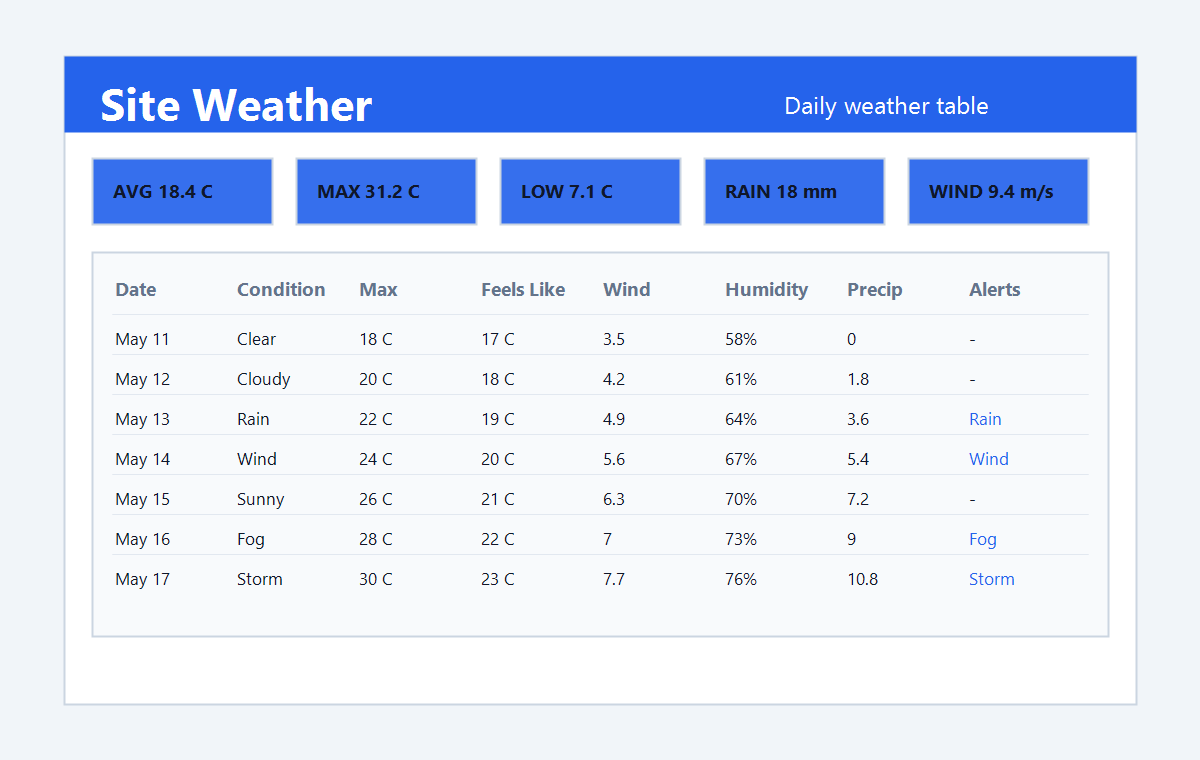
Site Weather

Weather Records for Site Work

Review daily weather history, construction alerts and charted conditions from the project weather location.

  • Weather table with filters
  • Temperature, wind and precipitation badges
  • Chart view and export workflow
ArchiMesh Site Weather
Site Access Management

Site Access Records

Track site entry and exit records linked to workforce and project activity.

  • Access event records
  • Workforce-linked attendance
  • Site history for review
ArchiMesh Site Access Management
Kanban Board

Visual Task Management

Move work through clear columns and keep priorities, owners and progress visible.

  • Drag-and-drop task status updates
  • Owners, priorities and due dates
  • Project and personal task visibility
ArchiMesh Kanban Board
Notes

Fast Notes for Project Work

Capture notes for meetings, site work, follow-ups and personal project organization.

  • Structured notes by context
  • Quick follow-up capture
  • Searchable project memory
ArchiMesh Notes
MoM (Minutes of Meeting)

Meeting Minutes With Action Tracking

Record attendees, decisions and follow-up actions in a structured MoM workflow.

  • Agenda items and decisions
  • Action owners and due dates
  • Meeting history in project context
ArchiMesh MoM (Minutes of Meeting)
Seating Plan

Office Seating Allocation

Plan individual seating assignments for offices, teams and temporary project spaces.

  • Seat assignments by person
  • Occupancy and availability overview
  • Connected to workforce records
ArchiMesh Seating Plan
Timesheet & Expenses

Time and Expense Tracking

Capture work time and reimbursable expenses with project and workforce context.

  • Timesheet submission workflow
  • Expense records with supporting details
  • Review by person, team or project
ArchiMesh Timesheet & Expenses
Workforce Trainings

Training and Compliance Records

Track workforce training completion and readiness across offices and project sites.

  • Training records per workforce member
  • Compliance visibility before allocation
  • Evidence ready for review
ArchiMesh Workforce Trainings
Asset & Inventory Management

Assets and Inventory in One Place

Manage equipment, stock, assignments and locations across the organization.

  • Asset and inventory registers
  • Location and assignment tracking
  • Project-ready equipment visibility
ArchiMesh Asset & Inventory Management
Room Booking

Meeting Room Reservations

Reserve rooms and shared spaces with availability, ownership and scheduling clarity.

  • Availability-aware booking
  • Owner and time-slot tracking
  • Reduced room conflicts
ArchiMesh Room Booking
Office & Project Directories

Structured Company and Team Directories

Keep office and project contacts organized for faster communication.

  • Office and project contact lists
  • Company and role context
  • Searchable directory records
ArchiMesh Office & Project Directories
IFC Viewer

IFC Model Review in the Browser

Open and review IFC models directly in ArchiMesh with project permissions intact.

  • Built-in model viewing workflow
  • Browser-based access for project teams
  • Connected to project files and records
ArchiMesh IFC Viewer
Office Files Viewer (Word, Excel, PowerPoint and More)

Office File Preview Without Downloads

Preview common office files inside ArchiMesh so teams can review documents faster.

  • Word, Excel and PowerPoint previews
  • Project document context stays visible
  • Reduced uncontrolled file downloads
ArchiMesh Office Files Viewer (Word, Excel, PowerPoint and More)
Autodesk File Viewer (RVT, DWG, NWD and More)

Native Design File Review

Coordinate RVT, DWG, NWD and related design files from the same project workspace.

  • RVT, DWG and NWD file workflows
  • Design files kept in project context
  • Access controlled through ArchiMesh
ArchiMesh Autodesk File Viewer (RVT, DWG, NWD and More)
Primavera P6 XER Viewer

Primavera P6 Schedule Preview

Open XER schedule files in ArchiMesh for planning reviews without separate handoffs.

  • XER schedule viewing workflow
  • Planning files stored with the project
  • Useful for schedule review meetings
ArchiMesh Primavera P6 XER Viewer
Mail & Distribution Lists

Mail and Project Distribution Lists

Manage project communication lists and mail workflows from the same workspace.

  • Distribution list management
  • Project communication context
  • Searchable communication records
ArchiMesh Mail & Distribution Lists
Team & Project Chat

Team and Project Chat

Keep project conversations in ArchiMesh instead of scattered external tools.

  • Team messaging workflow
  • Project-context conversations
  • Searchable communication history
ArchiMesh Team & Project Chat
Video Meetings

Project Video Meetings

Start and manage video meetings from the project collaboration workspace.

  • Browser-based meeting workflow
  • Project context close to the call
  • No separate meeting handoff needed
ArchiMesh Video Meetings
Calendar

Project and Workspace Calendar

Coordinate events, deadlines, bookings and planned activities in one calendar.

  • Shared project dates
  • Deadlines and events
  • Calendar context for teams
ArchiMesh Calendar
File Sharing

Secure Drag-and-Drop File Sharing

Share files and folders with controlled links while keeping data inside ArchiMesh.

  • Drag-and-drop file workflow
  • Secure external share links
  • Expiry and access controls
ArchiMesh File Sharing
Knowledge Base

Internal Knowledge Base

Publish guidance, procedures and lessons learned for teams across projects.

  • Structured knowledge articles
  • Team guidance in one place
  • Searchable operating knowledge
ArchiMesh Knowledge Base
Service Desk

Service Desk Ticketing

Route internal service requests through tickets with ownership and status visibility.

  • Ticket creation and assignment
  • Priority and status tracking
  • Resolution history
ArchiMesh Service Desk
Recruitment & Jobs

Recruitment Pipeline Management

Manage job records, candidates and hiring stages in a structured workflow.

  • Job and candidate records
  • Pipeline stage tracking
  • Hiring notes and actions
ArchiMesh Recruitment & Jobs
Seating Plans

Team Seating Layouts

Create seating layouts for teams, offices and changing project organizations.

  • Seat layout planning
  • Workforce-linked assignments
  • Occupancy visibility
ArchiMesh Seating Plans
BIM Clash Reports

BIM Clash Follow-Up

Track clash reports, responsibilities and resolution status across coordination teams.

  • Clash item registration
  • Owner and status tracking
  • Coordination history
ArchiMesh BIM Clash Reports
PTW (Permit to Work) Management

Permit to Work Control

Run native permit workflows for high-risk work with reviews and approvals.

  • Structured PTW requests
  • Review and approval tracking
  • Permit evidence in project records
ArchiMesh PTW (Permit to Work) Management
Defect Management

Defect Capture and Close-Out

Record defects, assign owners and track resolution with photos and comments.

  • Defect records with attachments
  • Responsible company assignment
  • Status and close-out history
ArchiMesh Defect Management
RFI (Request for Information) Management

RFI Tracking and Responses

Raise RFIs, assign answers and keep every response traceable in the project.

  • Question, owner and due date tracking
  • Attachments and response history
  • Open and closed RFI visibility
ArchiMesh RFI (Request for Information) Management
Incident Reports

Incident Reporting Workflow

Capture incidents with structured facts, evidence and follow-up actions.

  • Incident details and attachments
  • Investigation and corrective actions
  • Audit-ready incident history
ArchiMesh Incident Reports
Health & Safety Observations

Health and Safety Observations

Record site observations and turn them into visible follow-up work.

  • Observation records from site
  • Positive and negative findings
  • Action tracking where needed
ArchiMesh Health & Safety Observations
Health & Safety Cards

Health and Safety Cards

Issue and track safety cards for workforce behavior and site safety improvement.

  • Safety card records
  • Acknowledgement and status tracking
  • Workforce and project context
ArchiMesh Health & Safety Cards
Toolbox Talks

Toolbox Talk Records

Plan and document toolbox talks with topics, attendance and evidence.

  • Toolbox talk sessions
  • Attendees and topic tracking
  • Audit-ready talk evidence
ArchiMesh Toolbox Talks
Waste Management

Site Waste Management

Track waste records, quantities, categories and disposal evidence for projects.

  • Waste quantity records
  • Disposal and transfer context
  • Environmental evidence tracking
ArchiMesh Waste Management
Construction Product Management

Construction Product Records

Manage product and material information with documents, approvals and safety context.

  • Product and material register
  • Technical document records
  • Approval and safety visibility
ArchiMesh Construction Product Management
Commissioning

Commissioning and Handover Tracking

Track commissioning assets, checks, issues and handover readiness.

  • Commissioning asset records
  • Checks and issue tracking
  • Handover evidence workflow
ArchiMesh Commissioning
Site Cameras

Site Camera Monitoring Context

Keep site camera information close to progress, media and reporting workflows.

  • Site camera records
  • Remote progress context
  • Visual site evidence
ArchiMesh Site Cameras
Workforce Roster

Workforce Roster Planning

Plan workforce availability, shifts and site readiness across teams.

  • Rostered work patterns
  • Planned attendance visibility
  • Team availability context
ArchiMesh Workforce Roster
Site Allocation Planner

Workforce Site Allocation

Plan where people are assigned across project sites and active work zones.

  • Site assignment records
  • Team allocation visibility
  • Project staffing context
ArchiMesh Site Allocation Planner
Organizational Charts

Project Organization Charts

Map companies, teams, roles and reporting lines for project delivery.

  • Role and reporting structures
  • Company and team visibility
  • Responsibility mapping
ArchiMesh Organizational Charts
Site Photos, Videos & 360 Photos

Visual Site Media

Store site photos, videos and 360 photos as structured project evidence.

  • Photo, video and 360 records
  • Media organized by project context
  • Evidence for reporting and claims
ArchiMesh Site Photos, Videos & 360 Photos
Scheduling & Takt Planning

Scheduling and Takt Planning

Plan timelines, dependencies and zone-based work flow from one workspace.

  • Schedule and planning views
  • Takt zone coordination
  • Progress-linked planning context
ArchiMesh Scheduling & Takt Planning
Progress Management

Project Progress Tracking

Monitor planned versus actual progress and identify completion risks earlier.

  • Progress records by work area
  • Planned versus actual visibility
  • Reporting-ready progress data
ArchiMesh Progress Management
Contract Management

Contract Record Management

Keep contract values, parties, terms and commercial context structured.

  • Contract records and key terms
  • Value and responsibility tracking
  • Commercial workflow connection
ArchiMesh Contract Management
Invoice Management

Invoice Tracking Workflow

Manage invoices with status, supporting information and commercial context.

  • Invoice records and values
  • Review and approval status
  • Contract and cost linkage
ArchiMesh Invoice Management
Change Order Management (SWIs & SVOs)

SWI and SVO Change Control

Track work instructions, variation orders and change impacts from request to resolution.

  • SWI and SVO records
  • Cost and schedule impact tracking
  • Approval and notice linkage
ArchiMesh Change Order Management (SWIs & SVOs)
Notice Management

Contractual Notice Tracking

Create and monitor notices with dates, owners, status and evidence.

  • Notice records and deadlines
  • Owner and response tracking
  • Evidence-ready notice history
ArchiMesh Notice Management
Easy Project Search Module

Project Search Across Modules

Find project records, files, people and actions faster from one search workflow.

  • Search across project data
  • Fast file and record discovery
  • Reduced navigation time
ArchiMesh Easy Project Search Module
Weather with History
Weather and Historical Conditions

Capture weather context for site diary, delay analysis and project evidence.

  • Current and historical weather
  • Diary and claim context
  • Delay evidence support
ArchiMesh Weather with History
Announcements

Project Announcements

Broadcast important updates to teams and keep them visible in the workspace.

  • Targeted announcement publishing
  • Workspace visibility
  • Project communication history
ArchiMesh Announcements
Easy Support System via ArchiMesh Ticket System

ArchiMesh Ticket Support

Give users a direct ticket workflow for support requests and resolution tracking.

  • Support ticket records
  • Priority and ownership tracking
  • Resolution history
ArchiMesh Easy Support System via ArchiMesh Ticket System

Your Files. Your Rules.
Choose Where They Live.

Select a file storage region for each project independently. Every file - plans, drawings, documents, attachments, media, and more - stays in the region you choose to help support local data residency and governance requirements.

Europe

Amsterdam
Frankfurt
London
Milan
Paris

Americas

N. Virginia
Oregon
Texas
Toronto

Asia-Pacific

Singapore
Tokyo
Osaka
Sydney
Per-project region selection
AES-256 encryption at rest
Files never leave your chosen region
Supports GDPR and data sovereignty workflows

Many construction platforms make storage region choices at account level or through sales-led enterprise configuration. ArchiMesh works differently: each project can use its own file storage region, so international teams can align storage choices with each project's data governance needs.

Built for Multilingual Jobsites
184 Supported Language Locales

ArchiMesh lets multinational project teams work across offices, job sites and subcontractor networks without buying separate language packs.

One workspace, local language comfort.

Each user can work in their preferred language, including right-to-left locales, while the same project data stays connected for the whole team.

184 language locales
per-user preference
right-to-left support

Trusted by Construction
Professionals Worldwide

See what project managers, site engineers and contractors say about ArchiMesh.

"ArchiMesh replaced 5 different tools for us. Plans, defect tracking, RFIs, scheduling - everything in one place. Our team on-site finally stopped complaining about switching between apps."

Michael Kramer
Project Director - Strassner Bau GmbH

"The site diary keeps everything aligned every day. We log photos, workforce notes and progress updates, then generate clean reports for approvals and handover quickly."

Sarah Brenner
Site Engineer - Alpine Construction AG

"We manage 12 active projects with ArchiMesh. The BIM viewer, quantity take-off and bill of quantities are game changers. Our subcontractors use free viewer accounts to access drawings - no more email chains."

Thomas Hofmann
Managing Director - Hofmann & Partner Baumanagement

"Switched from PlanRadar and saved over 40% on licensing costs. ArchiMesh gives us more modules at a flat rate - contracts, invoices, permit to work, roster - things we had to buy separately before."

Lisa Weber
Head of Digital Construction - Meridian Infrastructure

"The integrated messaging, email system and minutes of meeting module eliminated our need for separate communication tools. Having everything tied to the project context is invaluable for audit trails."

Robert Pfeiffer
Quality Manager - EuroBuild Contractors

One Price. Every Module.
No Surprises.

One plan, one price - no tiers, no per-module fees, no volume-based pricing, no hidden costs. Every user gets the full platform with unlimited projects, unlimited storage, ArchiPilot AI, 184 language locales and 13 selectable file storage regions.

All-In-One
$ 79 /user/month

billed annually

All modules. Unlimited projects. Unlimited storage. ArchiPilot AI included.

Start Free Trial

No credit card required - 14-day free trial

Everything included in your plan

Plans, Files & BIM

  • Plans and documents with approvals
  • Revision tracking and version history
  • Built-in IFC viewer included
  • Word, Excel and PowerPoint viewer
  • Free XER / Primavera P6 viewer
  • BIM coordination and clash reports

Project Management

  • Unlimited projects
  • Kanban board and notes
  • Master schedule and Takt planning
  • Progress tracking (planned vs actual)
  • Site diary, weather and action tracking
  • Easy project search module

Field & EHS

  • Defect management and pin on plans
  • RFI (Request for Information)
  • Permit to work (PTW)
  • EHS incidents and observations
  • Safety cards and toolbox talks
  • Waste management and site access

Commercial & Quantity

  • Bill of quantities (BoQ)
  • Quantity take-off from drawings
  • Invoice management and approvals
  • Contract management
  • Change orders (SWI and SVO)
  • Notices, product register and commissioning

Workforce & Operations

  • Workforce roster and site allocation plan
  • Timesheets and expenses
  • Workforce trainings
  • Asset and inventory management
  • Room booking and seating plans
  • Organization charts and directories

Communication & Knowledge

  • Team chat and internal file sharing
  • Mails and mail lists
  • Video meetings and calendar
  • Minutes of meeting and notes
  • Knowledge base and service desk
  • Recruitment and jobs

Global & AI

  • ArchiPilot native project AI
  • 184 language locales
  • 13 selectable file storage regions
  • Project-level storage region selection
  • User profile storage region selection
  • Unlimited storage

Access & Governance

  • Secure guest links with password and expiry
  • Permission controls and approvals
  • Digital signatures and audit trails
  • Construction photos, videos and 360 photos
  • Custom reports and PDF / Excel exports
  • Advanced reporting tools
  • Mobile and tablet access

Viewers and Proprietary Model Unlocks
IFC viewing, Office file preview and XER / Primavera P6 viewing are included. Upload and store unlimited 3D files in ArchiMesh at no extra cost. Direct in-browser viewing for proprietary Revit, Navisworks and DWG files costs $9 per file as a one-time payment; after that, the unlocked file can be viewed by unlimited users.

IFC - Included Office files - Included XER / P6 - Included RVT - $9 one-time / file NWD - $9 one-time / file DWG - $9 one-time / file

Need a custom plan?

For larger organizations needing dedicated support, custom training, SSO, API access or tailored onboarding - contact our team.

Contact Sales

All prices excl. VAT. 14-day free trial. Cancel anytime.

ArchiMesh vs Procore, Autodesk Forma (ACC), PlanRadar and Fieldwire

Procore ≈ $600k $300M ACV -> $600k/year
Autodesk Forma Build (ACC) $117 per user / month, billed annually
PlanRadar $159 per user / month, billed annually
Fieldwire $89 per user / month, billed annually
Native module / function
ArchiMesh
Procore
Autodesk Forma
PlanRadar
Fieldwire
Scale
Unlimited projects / plans
Yes
Partial
Partial
Partial
Yes
Unlimited storage / data
Yes
Yes
Partial
Yes
Partial
13 selectable file storage regions
Yes
No
Partial
No
No
Per-project/user storage region choice
Yes
No
No
No
No
184 language locales
Yes
No
Partial
Partial
Partial
AI and viewers
Native AI project assistant
Yes
No
No
No
No
IFC viewer included
Yes
Partial
Yes
Partial
Partial
Office file viewer included
Yes
Partial
Yes
Partial
No
XER / Primavera P6 viewer included
Yes
No
No
No
No
RVT / DWG / NWD viewer
Yes
Partial
Yes
No
No
BIM clash reports
Yes
Partial
Partial
No
No
Core project management
Kanban board
Yes
No
No
No
No
Notes
Yes
No
No
No
No
MoM / meetings
Yes
Yes
Yes
No
No
Seating plans
Yes
No
No
No
No
Plans
Yes
Yes
Yes
Partial
Yes
Documents
Yes
Yes
Yes
Yes
Yes
Easy project search
Yes
No
No
No
No
Takt planning
Yes
No
No
No
No
Scheduling
Yes
Yes
Yes
Yes
Partial
Progress management
Yes
Yes
Yes
No
No
Field, quality and safety
Defect management
Yes
Yes
Yes
Yes
Yes
RFI management
Yes
Yes
Yes
No
Yes
PTW management
Yes
No
No
No
No
EHS incident reports
Yes
Yes
No
No
No
EHS observations
Yes
Yes
No
No
No
EHS safety cards
Yes
No
No
No
No
EHS toolbox talks
Yes
No
No
No
No
EHS waste management
Yes
No
No
No
No
Site diary
Yes
Yes
Partial
Yes
Yes
Site weather table and chart history
Yes
Partial
No
Partial
Partial
Site access management
Yes
No
No
No
No
Photos, videos and 360 photos
Yes
Yes
Yes
Partial
Yes
Commercial controls
Quantity take-off
Yes
Yes
Partial
No
No
Bill of quantities
Yes
Yes
Partial
No
No
Contract management
Yes
Yes
Yes
No
No
Invoice management
Yes
Yes
Yes
No
No
Change orders - SWI / SVO
Yes
Yes
Yes
No
Yes
Notice management
Yes
Yes
Yes
No
No
Construction product management
Yes
No
No
No
No
Commissioning module
Yes
No
No
No
No
Workforce and office
Timesheet and expenses
Yes
No
No
No
No
Workforce trainings
Yes
No
No
No
No
Asset and inventory management
Yes
No
No
No
No
Room booking
Yes
No
No
No
No
Office and project directories
Yes
Yes
No
No
No
Workforce roster
Yes
No
No
No
No
Workforce site allocation plan
Yes
No
No
No
No
Organizational charts
Yes
No
No
No
No
Communication and support
Mails and lists
Yes
Yes
No
No
No
Video meetings
Yes
No
No
No
No
Calendar
Yes
No
No
No
No
Dropbox-style file sharing
Yes
No
No
No
No
Knowledge base
Yes
No
No
No
No
Service desk
Yes
No
No
No
No
Recruitment and jobs
Yes
No
No
No
No
MS Teams-style team chat
Yes
No
No
No
No
Yes - full comparable native module or capability No - no comparable support Partial - limited, add-on, plan cap or not same scope

Competitor costs checked on 19 May 2026 from public official pricing sources where available. Procore ACV means the aggregate construction value run through Procore, not normal company revenue; for subcontractors, that should mean the contracted scope run through Procore, not the whole project value. Procore official pricing is quote-based with an upfront annual fee by product and ACV, so the card uses an example of $300M ACV at an external ≈ 0.2% estimate, equal to about $600k/year or $50k/month. Autodesk Forma Build is shown as $117/user/month billed annually, or $175/user/month billed monthly. PlanRadar Pro is capped at 100 plans per user and is shown as $159/user/month billed annually, or $179/user/month billed monthly. Fieldwire Business Plus is shown as $89/user/month billed annually, or $104/user/month billed monthly. Comparison marks comparable native/dedicated modules only: generic forms, PDFs, templates, comments, item conversations, ticket notes, schedule/calendar views, document repositories, partner integrations and add-ons are not counted as full ArchiMesh module equivalents.

Security & Quality
Standards

ArchiMesh is prepared for enterprise security, privacy, quality, service, ethics and environmental reviews with standard-led operating controls.

ISO 27001

Information security controls for protecting project data, access, suppliers and operations.

ISO 27701

Privacy management practices for personal data handling and GDPR-aligned workflows.

ISO 9001

Quality management processes for consistent delivery, documentation and improvement.

ISO 20000-1

Service management discipline for SaaS operations, support, incidents and SLAs.

ISO 37001

Anti-bribery management controls for procurement and construction supply chains.

ISO 10002

Customer satisfaction and complaint-handling processes for tracked issue resolution.

ISO 14001

Environmental management controls supporting sustainability and ESG reporting.

Ready to Build Smarter?

+50 native modules in one platform - ArchiPilot AI, plans, BIM, viewers, scheduling, defects, RFI, commercial, workforce, email, messaging, support, 184 language locales and 13 selectable file storage regions. Start your free trial today.

Get Started Free

Stay in the Loop

Get the latest construction tech insights, product updates, and industry tips delivered straight to your inbox.

This site is protected by Cloudflare Turnstile and the Cloudflare Privacy Policy applies.